
Web Hosting in Singapore: What to Look For
By Novatise · 12 min read · 26 October 2026 · Updated 10 November 2026

The best web hosting for a Singapore website is the one that keeps your site fast for visitors in Singapore and the region, keeps it secure and backed up, and gives you support you can reach when something breaks. A Singapore or nearby data centre helps, a CDN helps more, and for business sites the quality of backups, security and support matters more than the lowest monthly price.
For most Singapore business websites the best web hosting is a managed plan with a Singapore or nearby data centre, a CDN in front of it, daily off-site backups and support you can actually reach. Shared hosting is fine for a small brochure site. Online shops, booking sites and busy WordPress sites are better on managed WordPress or cloud hosting. Compare hosts on renewal price, backups, security patching and how easy it is to leave, not on the first-year deal.
Read the video transcript
Looking for the best web hosting in Singapore? For most business websites, it's a managed plan with a Singapore or nearby data centre, a CDN in front of it, daily off-site backups and support you can actually reach.
We no longer rank hosts, because plans, owners and prices change too often. The guide is now a checklist you can use with any provider, and it has no affiliate links.
Pick the type of hosting before you look at brands. Shared hosting is fine for a small brochure site, but online shops, booking sites and busy WordPress sites are better on managed WordPress or cloud hosting.
Then think about location. If most of your visitors are in Singapore or Southeast Asia, choose a Singapore or nearby data centre and put a CDN in front of it.
For a business site, backups, security and support matter more than the lowest monthly price. Look for daily off-site backups, fast security patching and 24/7 support from people who will actually investigate.
Compare hosts on renewal price and how easy it is to leave, not on the first-year deal. And while the PDPA doesn't say your website must be hosted in Singapore, you should know where your data is stored.
The full checklist is on novatise.com.
We used to publish a ranked list of hosts. Plans, owners and prices change too often for a ranking to stay accurate, so this page is now a checklist you can apply to any provider. It contains no affiliate links, and Novatise does not earn commission from any host mentioned here.
What to look for in Singapore web hosting
- Server location. If most visitors are in Singapore or Southeast Asia, choose a host with a Singapore (or nearby) data centre for the origin server. Many international hosts offer a Singapore option at sign-up.
- CDN. A content delivery network caches pages and images close to visitors and absorbs traffic spikes and some attacks. A good CDN often matters more than the origin location.
- Type of hosting. Shared hosting is cheapest but shares resources with other sites. Managed WordPress hosting adds caching, updates and expert support. A VPS or cloud server gives full control but needs someone to manage it. Static sites can run on edge platforms with very little upkeep.
- Backups. Automatic daily backups stored away from the server, with easy restores, and a copy you control yourself.
- Security. Firewall, malware scanning, DDoS protection, free SSL, and fast patching of PHP and server software. Sites on outdated PHP are a common target; see our PHP zero-day case study.
- Support. 24/7 support from people who will investigate the problem, not only send links to help articles.
- Data and compliance. Where data is stored, the host’s data-processing terms, and whether that fits your PDPA obligations and your customers’ requirements.
- Renewal pricing and exit. Introductory prices often rise at renewal. Check that you can export your site, database and email easily.
Types of web hosting in Singapore, compared
Most searches for “web hosting Singapore” or “best web hosting” end on a list of brand names. The more useful question comes first: which kind of hosting does your site need? Get that right, and the shortlist gets much shorter.
| Type | Best for | Who looks after it | Watch out for |
|---|---|---|---|
| Shared hosting | Small brochure sites, personal sites, early tests | The host runs the server; you run the site and its updates | Slowdowns from other sites on the same server, limited support, big renewal increases |
| Managed WordPress hosting | Business WordPress sites, WooCommerce shops, content sites | The host handles caching, server updates and often plugin-level security | Plugin restrictions, per-site pricing and visit limits |
| VPS or cloud server | Custom apps, several sites, special software needs | You or your developer, unless you pay for management | Nobody patches it unless someone is clearly responsible |
| Static and edge hosting | Fast marketing sites, documentation, sites built with a static generator or framework | The platform; there's very little server to maintain | Forms, search and logins need separate services |
Hosting for agencies is a variation on the same choice: one account holding many client sites. That's convenient but make sure each client can be moved out on their own, and that one hacked site can't reach the others.
How fast does a Singapore website need to be?
Google publishes three speed and stability measures it calls Core Web Vitals. Its stated targets for a good experience are a Largest Contentful Paint within 2.5 seconds, an Interaction to Next Paint of 200 milliseconds or less, and a Cumulative Layout Shift of 0.1 or less. Hosting affects the first one most, because a slow server delays everything that comes after it.
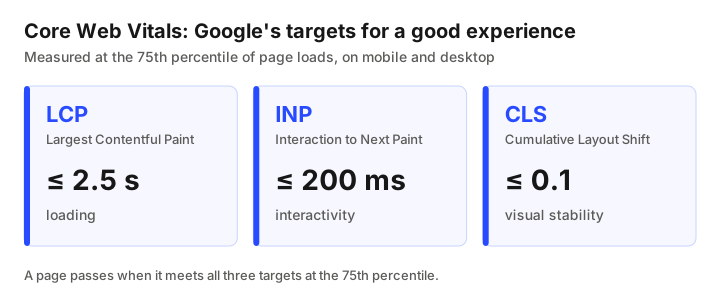
Chart data
| Metric | Good target | Measures |
|---|---|---|
| Largest Contentful Paint (LCP) | within 2.5 seconds | loading |
| Interaction to Next Paint (INP) | 200 milliseconds or less | interactivity |
| Cumulative Layout Shift (CLS) | 0.1 or less | visual stability |
Hosting isn't the only cause of a slow site though. Heavy images, too many plugins, chat widgets and tracking scripts often cost more time than the server does. Before you blame (or switch) your host:
- Run your homepage and a key service page through PageSpeed Insights and note the results.
- Check how long the server takes to send the first byte. If that part alone is slow, the host or the site's caching is a likely cause.
- Test again with caching on and with a CDN in front. If the numbers improve a lot, the fix may be setup, not a new provider.
- Repeat at a busy time of day. Shared servers often slow down when neighbours are busy.
Connections in Singapore are fast. With median speeds like these, a page that still loads slowly is usually down to the site or its server, not the visitor’s network.
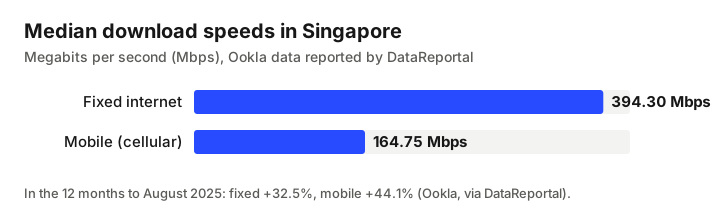
Chart data
| Connection | Median download speed | Change, 12 months to Aug 2025 |
|---|---|---|
| Fixed internet | 394.30 Mbps | +32.5% |
| Mobile (cellular data) | 164.75 Mbps | +44.1% |
The “fastest WordPress hosting in Singapore” is usually a well-configured setup rather than one specific brand. A regional server with page caching, an object cache and a CDN will beat an expensive plan with none of those turned on.
WordPress hosting in Singapore: what's different
Plenty of small business sites in Singapore run on WordPress and WordPress has its own hosting needs. Look for:
- Current PHP versions and a host that moves you off old ones before they stop getting security fixes. Our PHP zero-day case study shows what happens when sites are left behind.
- Staging sites, so plugin and theme updates can be tested before they reach customers.
- Server-level caching that works with WooCommerce carts and logged-in users without showing one customer's data to another.
- Malware scanning and a web application firewall, plus a clear answer to “what do you do if my site is hacked?”
- One-click restores from backups kept somewhere other than the same server.
Domain, email and hosting: keep them apart
Many people searching for “domain hosting Singapore” want one company to handle the domain, the website and email. It's convenient at the start. But it can make leaving painful later because moving the website can break email, and an expired card can take all three offline at once.
A setup that's easier to live with: keep the domain at a registrar you control, run DNS through a provider such as Cloudflare, host email with a dedicated email service, and point the website to whichever host suits it. Each piece can then change without touching the others. Whatever you choose, make sure the domain is registered in your company's name and that you have the login, not your web designer.
Does website data have to stay in Singapore under the PDPA?
Not necessarily. The PDPA does not say a website must be hosted in Singapore. It does contain a Transfer Limitation Obligation. According to PDPC’s Advisory Guidelines on Key Concepts in the PDPA (revised 29 April 2026), an organisation may transfer personal data overseas if it has taken appropriate steps to ensure the overseas recipient is bound by legally enforceable obligations, or specified certifications, to protect the data to a standard comparable to the PDPA.
In practice for a hosting decision, that means asking where form submissions, customer accounts and backups are stored, reading the host's data-processing terms and keeping a record of what you checked. Some customers, especially in government-linked or regulated sectors, will ask for Singapore-only storage in their contracts anyway. This is general information, not legal advice.
Cheap web hosting: when it's fine and when it costs you
Cheap web hosting is fine when the site is small, changes rarely and and losing it for a day would be annoying rather than expensive. It stops being cheap when the site takes orders or bookings, when you have no one to update WordPress, or when a hack means days of clean-up. A few things to check on any low-price plan:
- What the plan costs on renewal, not only in year one.
- Whether backups are included, how long they're kept and whether restores cost extra.
- Whether SSL, the CDN and malware clean-up are included or sold as add-ons.
- How many sites and how much traffic the plan really allows before you're asked to upgrade.
How to compare web hosting providers in Singapore, step by step
- Write down what the site does. Brochure, shop, bookings, member logins, number of pages and rough monthly visitors.
- Pick the hosting type from the table above before you look at brands.
- Shortlist three providers that offer a Singapore or nearby data centre for that type.
- Ask each the same questions: backup frequency and location, restore process, PHP and server patching, what support covers, renewal price, and how to export everything if you leave.
- Test support before you buy. Send a pre-sales question and see how quickly and how well they reply.
- Run a trial or a copy of your site on the new host and measure it the same way you measured the old one.
- Plan the move using the migration checklist below.
Worked examples (illustrative)
These are made-up examples to show the reasoning. They aren't client cases.
A 10-page service business site. A renovation firm with a WordPress site, contact form and a project gallery gets most of its visits from phones in Singapore. A managed WordPress plan with a regional data centre, daily off-site backups and a CDN covers it. The bigger wins are probably compressing gallery images and making sure enquiries from the form reach someone quickly.
An online shop with a few hundred products. A WooCommerce store taking payments needs more: staging for updates, caching that understands carts, a firewall, and a person who's responsible for patching. Managed WooCommerce hosting or a properly managed cloud server both work. And the deciding factor is usually who will look after it every month, not which brand is fastest in a test.
Moving hosts without losing traffic or rankings
A host move shouldn't hurt your search rankings if URLs stay the same and the site stays up. A simple checklist:
- Take a full backup of files and the database, and keep a copy you control.
- Lower the DNS time-to-live a day before the switch so the change spreads quickly.
- Build and test the site on the new host using a temporary address.
- Check forms, payments, logins, SSL and email sending before you switch.
- Switch DNS, then watch for errors and test again from a phone network.
- If any URLs change, map old to new with 301 redirects. Our free redirect manager and broken link checker help with this.
- Watch Google Search Console for crawl errors over the next few weeks.
If speed and rankings are both a concern, a website and SEO audit will show whether hosting is really the problem.
Hosts our readers ask about
Two hosts from our original list still bring readers to this site. We have rewritten both pages as neutral summaries based on each provider’s public website:
- A2 Hosting in Singapore, now operating as hosting.com, with a Singapore data centre option.
- WPX hosting for Singapore sites, a managed WordPress host with its own CDN.
How Novatise hosts sites
We run our own sites, including this one, behind Cloudflare, with uptime monitoring and automatic rollback on unhealthy releases. For clients we design and set up hosting on Cloudflare, AWS, Vercel or Supabase depending on the application, and secure WordPress fleets together with Cyber Securitise. See IT infrastructure & security.
Frequently asked questions
It helps but is not essential. A Singapore or nearby origin server reduces latency for local visitors, and a CDN caches content close to visitors wherever they are. For most business sites, a good CDN plus a regional origin is enough.
For a small brochure site with modest traffic, often yes. For e-commerce, membership sites or anything critical to sales, managed hosting or a cloud setup with proper backups, security and support is usually worth the extra cost.
No. This guide contains no affiliate links, and Novatise does not earn commission from any host mentioned.
There isn’t one best host for every site. For most Singapore business websites, a managed plan with a Singapore or nearby data centre, a CDN, daily off-site backups and responsive support is the right type. Shortlist three providers of that type and compare renewal prices, backups, patching and exit terms.
Managed WordPress hosting is tuned for WordPress: server caching, current PHP versions, staging sites, malware scanning and one-click restores. Normal shared hosting can run WordPress too, but you take on more of the updating and security work yourself.
It’s convenient but it ties everything together. Keeping the domain at a registrar you control, email with a dedicated provider and the website on a separate host makes it easier to change one without breaking the others.
Indirectly. A slow or often-down server hurts user experience and can make pages slower to crawl. Moving hosts does not hurt rankings by itself if URLs stay the same and the site keeps working.
The PDPA does not require Singapore hosting. If personal data is transferred overseas, the Transfer Limitation Obligation requires that it is protected to a standard comparable to the PDPA. This is general information, not legal advice.