
SEO Audit in Singapore: What a Good Website Audit Covers
By Novatise · 12 min read · 26 October 2026 · Updated 10 November 2026

An SEO audit is a health check for your website. A useful one answers three questions: what is stopping your pages from ranking now, what to fix first, and what to do over the next 90 days to grow qualified traffic. It should be built from your own Search Console data and a crawl of your site, not a generic score from an automated tool.
An SEO audit in Singapore should tell you three things: why your pages aren't ranking or getting clicks, which fixes to make first, and what to do over the next 90 days. A useful audit is built from your own Google Search Console data plus a crawl of the site, and it covers indexing, technical health and speed, on-page content, internal links, structured data, local SEO, backlinks, conversion and basic security. You can do the basics yourself with free tools; pay for an audit when you need someone to find causes and set priorities.
SEO is technical, and no business owner needs to know all of it. But every business that wants customers from Google needs it working. This guide sets out what a proper SEO audit covers, how to run the basics yourself with free tools, and what to look for in an SEO audit service in Singapore or elsewhere in Asia.
What is an SEO audit?
An SEO audit (or website audit) is a structured review of everything that affects how search engines find, understand and rank your site. With SEO there are many variables in play, and people inside a business are often blind to the gaps. An outside review gives you a prioritised list instead of a vague feeling that “SEO isn’t working”.
A good audit ends with three things:
- A diagnosis: what is not working with your SEO right now, and why.
- A priority list: fixes ranked by impact and effort, so the first week of work makes the biggest difference.
- A 90-day plan: the content, technical and link work needed to grow qualified traffic and leads.
What a good SEO audit checks
1. Indexing and crawlability
Can Google reach and index the pages that matter? Check the Page indexing report in Google Search Console, your robots.txt and XML sitemap, canonical tags, noindex tags left over from development, and redirect chains. A site migration that turns old URLs into 404 errors is one of the most common causes of lost traffic.
2. Technical health and speed
Broken links, server errors, slow pages and poor mobile layout all cost rankings and conversions. Look at Core Web Vitals, image sizes, render-blocking scripts and HTTPS everywhere.
These are the targets Google publishes for a good page experience:
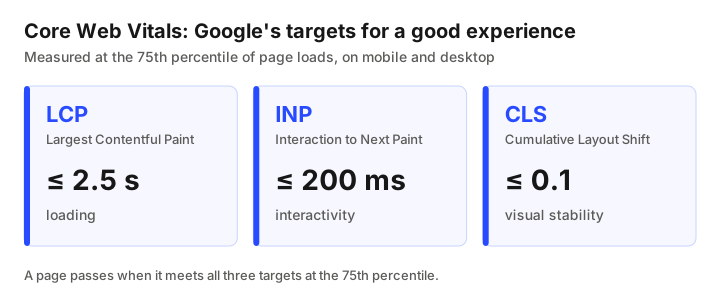
Chart data
| Metric | Good target | Measures |
|---|---|---|
| Largest Contentful Paint (LCP) | within 2.5 seconds | loading |
| Interaction to Next Paint (INP) | 200 milliseconds or less | interactivity |
| Cumulative Layout Shift (CLS) | 0.1 or less | visual stability |
3. On-page SEO
Does each important page target a clear search intent, with a descriptive title tag, a single H1, logical subheadings, and a meta description that earns the click? Pages that compete for the same query should be merged or differentiated.
4. Content quality and gaps
Compare your pages with what ranks for your target queries. Look for thin pages, outdated information, missing topics your customers ask about, and pages with impressions but almost no clicks. Those are often the quickest wins.
5. Internal linking
Internal links tell search engines which pages matter most and help visitors move toward a conversion. Orphan pages with no internal links rarely rank.
6. Structured data
Schema markup such as Organization, LocalBusiness, Article, FAQPage and Product helps search engines and AI assistants understand your pages. Validate it with Google’s Rich Results Test.
7. Local SEO
For businesses serving customers in Singapore, check your Google Business Profile, consistent name, address and phone details across directories, location pages, and reviews.
8. Backlinks and penalties
Review who links to you, spot spammy links or past link schemes, and check Search Console for manual actions. Recovery from a penalty starts with finding the cause.
9. User experience and conversion
Rankings only matter if visitors act. Review page layout, calls to action, forms and trust signals. Small UX fixes often lift leads more than new traffic.
10. AI search visibility and security
Search increasingly includes AI answers. Clear facts, consistent entity information and structured data help your brand get cited; see our note on optimising for AI search. A hacked site, injected spam pages or malware warnings can wipe out rankings overnight, so an audit should include a basic security check.
How to run a basic SEO audit yourself in 10 steps
If you'd like to try before hiring anyone, this is the order we'd follow on a small business site. Set aside a few hours, and keep notes in a spreadsheet: page, problem, fix, priority.
- Open Google Search Console and check the Page indexing report. Note important pages that aren't indexed, and why.
- Check your sitemap and robots.txt. The sitemap should list only live, indexable pages. Robots.txt shouldn't block anything you want found.
- Search Google for your own brand and key services. Note which page appears and whether the title and description make sense.
- In the Performance report, sort pages by impressions. Pages with many impressions but few or no clicks are your first content opportunities.
- Look at the queries for those pages. If a page shows for searches it doesn't really answer improve it so it does, or create a better-matched page.
- Test speed on your homepage and top landing pages with PageSpeed Insights, on mobile.
- Crawl the site for broken links and redirects. Fix links to pages that no longer exist and shorten redirect chains.
- Review titles and headings on your ten most important pages. One clear topic per page, one H1 and a title that would make you click.
- Check local details: your Google Business Profile, address and phone, and that they match the website.
- Test the conversion path. Fill in your own contact form on a phone and see what happens next.
Rank the problems you found by how much traffic or how many leads they affect, and how hard they are to fix. Start with high-impact, low-effort items.
Free SEO audit tools you can use today
You can cover much of a basic audit for free:
- Google Search Console for indexing, queries, impressions and manual actions.
- PageSpeed Insights for speed and Core Web Vitals.
- Novatise’s free tools, which run in your browser with no sign-up:
- Broken-Link Finder to check a page for dead outbound links.
- GSC 404 → Redirect Matcher to turn Search Console 404s into 301 redirect suggestions.
- Redirect Generator to produce clean redirect rules for nginx, Apache, Netlify or Shopify.
- Schema / JSON-LD Writer for Article, Breadcrumb and FAQ markup.
- Bulk Internal Linker to add internal links to an article.
- Wayback Recovery to recover content from deleted pages that still have links or impressions.
What a website audit report should contain
If you're buying an SEO audit in Singapore, or asking your current agency for a website analysis report, the report should be something you can act on. This is the structure we'd expect.
| Section | What it should include |
|---|---|
| Summary | The three to five problems that matter most, in plain language |
| Data reviewed | Which Search Console, analytics and crawl data were used, and the date range |
| Findings by area | Specific URLs, what's wrong, evidence (screenshots or data) and why it matters |
| Priority list | Each fix rated by impact and effort, with an owner |
| 90-day plan | Content, technical and local work in order, with checkpoints |
| KPIs | What will be measured to see if the fixes worked |
Be cautious of reports that are mostly automated scores and long lists of “warnings” without saying which ones matter for your business.
Technical website audit: what goes deeper
A technical website audit is the part that looks under the hood. On larger or older sites its often where the biggest problems hide. It usually adds:
- Server responses and errors over time, not just on the day of the audit.
- How JavaScript-heavy pages render for search engines.
- Duplicate URLs from filters, tracking parameters or www and non-www versions.
- Redirect maps after a redesign or platform move, matched against old URLs that still get links or impressions.
- Structured data errors and warnings.
- Security issues such as injected spam pages, outdated plugins and exposed files.
SEO audits for sites across Asia
If your business serves several countries in Asia from one site an SEO audit should also check how each market is handled. That means whether each country or language has its own pages, whether hreflang tags point to the right versions, whether prices, addresses and phone numbers are correct per market, and whether content is properly written for each language rather than machine-translated and left unchecked.
How long does an SEO audit take?
For a small business site, a thorough manual audit typically takes around a week, including crawling, reviewing Search Console data and writing recommendations. Large e-commerce sites or sites with migration problems take longer. Be wary of “instant audits”: an automated report is a starting point, not a diagnosis.
Worked example: reading Search Console after an audit (illustrative)
This is a made-up example. A Singapore services firm finds that one guide page gets a lot of impressions for a broad query but sits far down the results with almost no clicks. Its title targets a slightly different phrase to what people search, the page answers the question only halfway down, and no other page on the site links to it.
The audit recommends three fixes: rewrite the title and opening so they match the searcher's wording and intent, add a short direct answer at the top with more depth below, and link to the page from two related service pages. After a few weeks the firm compares impressions, average position and clicks for the same query. A change in position isn't guaranteed but this is the kind of specific, testable recommendation a good audit gives.
SEO KPIs to track after an audit
- Impressions and clicks for the queries and pages you're working on, from Search Console.
- Click-through rate for pages that already rank on page one.
- Average position for target queries, read as a trend rather than a daily number.
- Indexed pages: important pages indexed, unwanted ones excluded.
- Organic leads or sales from your analytics and CRM. This is the KPI that matters most.
As for timing, Google's own SEO Starter Guide says some changes may take effect in a few hours and others could take several months, and suggests waiting a few weeks to assess whether your work had an effect.
How to choose an SEO audit service in Singapore
- Ask for a sample report. It should contain specific URLs and prioritised fixes, not just scores.
- Check they use your data. A real audit needs read access to Search Console and analytics.
- Separate the audit from the retainer. A good audit is useful even if you implement it yourself.
- Ask about implementation. Who will make the fixes, and how will results be measured afterwards?
How Novatise approaches SEO
Novatise runs SEO and content operations on its own fleet of around 60 domains, where our content has grown to 100,000 search impressions and 30,000 clicks within 6–12 months. We bring the same workflows to client sites: technical fixes, structured data, redirect clean-ups after migrations, and verified content pipelines with a person approving every article. See AI media & content operations and how our content engines work. For sites that need security hardening as part of the fix, see the case study of our work with Cyber Securitise.
Frequently asked questions
A full SEO audit reviews indexing and crawlability, technical health and speed, on-page SEO, content quality and gaps, internal linking, structured data, local SEO, backlinks and penalties, user experience, and basic security. It should end with a prioritised fix list and a 90-day plan.
For a small business website, a manual audit usually takes about a week. Large e-commerce sites and sites recovering from a migration or penalty take longer.
You can cover the basics with free tools such as Google Search Console, PageSpeed Insights and Novatise’s free broken-link, redirect and schema tools. An experienced reviewer adds value in prioritising fixes and spotting causes that tools miss.
Yes. Customers search before visiting shops, clinics and restaurants. Local SEO, including your Google Business Profile and reviews, directly affects foot traffic.
The terms overlap. An SEO audit focuses on search visibility; a broader website audit also covers conversion, accessibility, performance and security. A good SEO audit includes the parts of those that affect rankings and leads.
Prices depend on the size of the site, how deep the technical review goes and whether implementation is included. Compare audits on what you will receive: specific URLs, a prioritised fix list, a 90-day plan and the data used. A cheap automated report is not the same product as a manual audit.
A short summary of the biggest problems, the data reviewed, findings by area with specific URLs and evidence, a priority list rated by impact and effort, a 90-day plan and the KPIs that will show whether the fixes worked.
Impressions, clicks and click-through rate for target queries and pages, average position as a trend, indexed pages, and most importantly the leads or sales that come from organic search.
A full audit once a year suits most small business sites, with a lighter monthly check of Search Console. Audit again after a redesign, a platform migration, a sudden traffic drop or a security incident.
Related guides
- Why SEO Is a Must-Do for Your Singapore Business
- SEO vs Facebook Marketing: Which Should Your Singapore Business Go For?
- Lead Generation in Singapore: A Practical Guide for B2B and B2C
- Web Hosting in Singapore: What to Look For
- You Can Rank #1 on Google and Still Never Be Named by ChatGPT
- All articles and field notes